
5 AI Workflows That Replace 500 Emails a Week (With Copy-and-Paste CRM Prompts)
Take a quick look at the screen of your phone.
What does that little red circle over your mail application say? Is it double digits? Triple? Or have you completely given up and let it climb into the thousands?
If your inbox looks like a digital crime scene, y'all aren't alone. Most business owners we talk to start their days with the exact same routine. They wake up, grab a cup of coffee, and spend the first two hours of their morning wading through a swamp of minor updates, internal questions, and scheduling back-and-forths.
Let's tell the radical truth here: Your email is no longer a communication tool. It has become a manual, high-stress task manager you never agreed to run.
Every day, you and your team waste valuable mental energy acting as human routers—manually copying data from one system, formatting it into an email, sending it off, and then chasing down a reply.
We call this digital debt. It’s the friction that stops your business from scaling.
But it doesn't have to be this way. By implementing secure AI business workflow automation, you can stop managing the noise and start leading your company.
Let’s look at five highly specific, practical automation blueprints that you can build inside your business right now—complete with copy-and-paste CRM prompts you can use today—to replace up to 500 low-value emails every single week.
Meet Sheryl: The Switchboard Operator
To see how this works in the real world, let’s look at a hypothetical business owner named Sheryl.
Sheryl runs a successful, fast-growing logistics and supply chain firm. She has a great team, clean offices, and more clients than she can handle.
On paper, Sheryl is a successful CEO. But in reality, Sheryl is a highly paid switchboard operator.
She spent yesterday morning sending fifteen emails back and forth with a new client just to collect their tax documents and onboarding forms. She spent the afternoon emailing three of her project managers to ask for "quick status updates" on a job. And she finished her evening by drafting a polite, awkward email to a client whose invoice was ten days overdue.

Sheryl worked ten hours yesterday, but she didn't spend a single minute on long-term strategy, market expansion, or high-value partnerships. She spent her entire day manual-routing information.
Here are the five secure workflows that can give Sheryl—and y'all—her focus back.
Workflow 1: The Automated Client Onboarding Pipeline
Replaces: The "Did you get my document?" email storm.
When you sign a new client, it should be a moment of celebration. Instead, it’s usually the start of an administrative avalanche. You have to send a welcome email, request tax documents, send intake questionnaires, set up secure folders, and manually notify your operations team.
Here is how you automate the entire process securely:
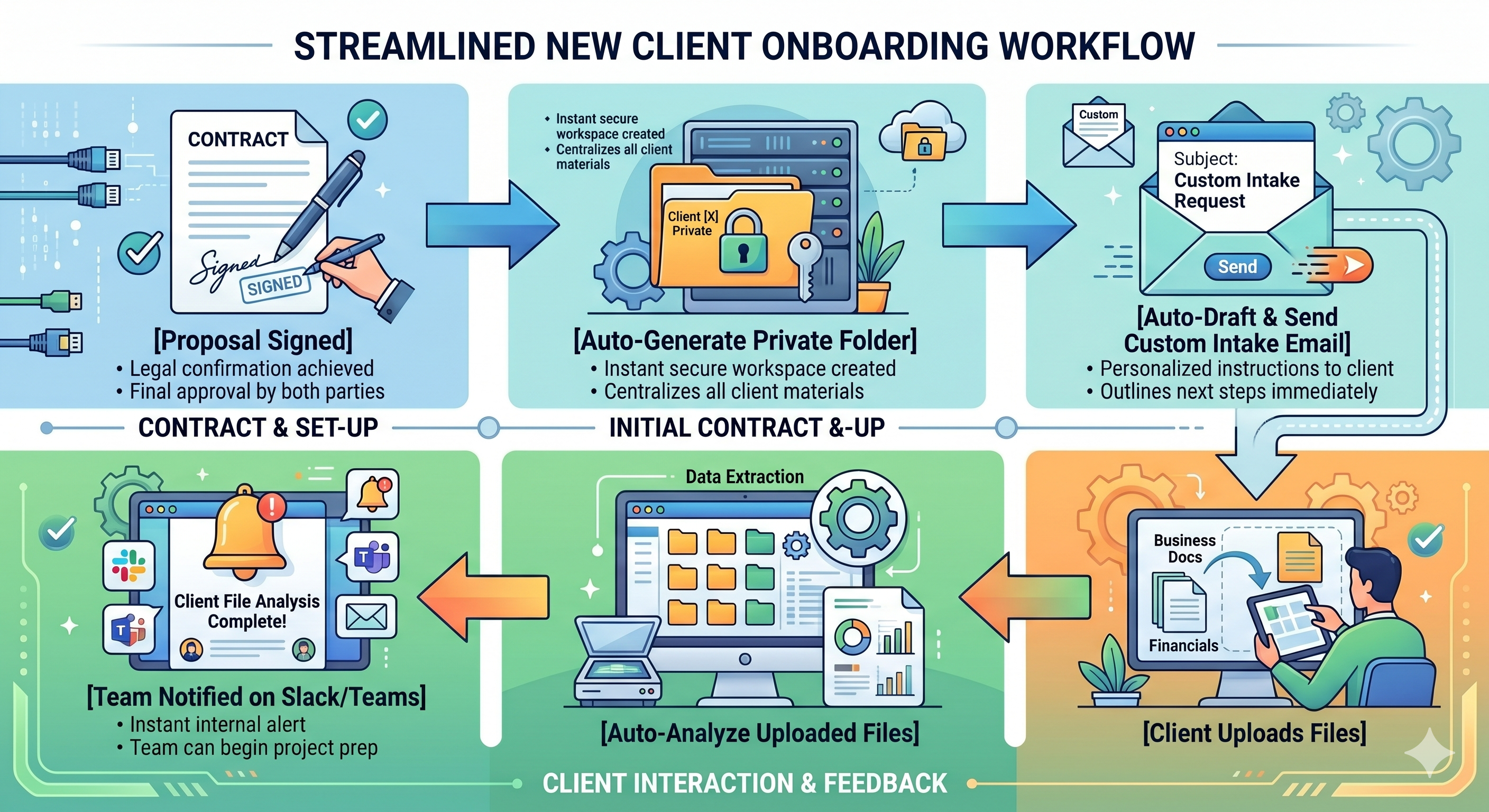
The Trigger: A prospect signs a digital proposal in your CRM or sales system.
The Automation: The system automatically creates a secure, private folder in your cloud storage (like Sharepoint or Google Workspace) and generates a unique, password-protected intake link for that client.
The Communication: An internal AI drafts a personalized, professional welcome email containing the intake link and a checklist of required documents. It sends this automatically from your account manager’s inbox.
The Completion: The moment the client uploads their documents, a secure script scans the files to verify they are correct (e.g., confirming the W-9 is actually signed), files them in the folder, and sends a quick message to your team's internal chat channel: "New Client Folder Built & Verified."
Total Emails Replaced: ~15 emails per new client.
📋 M3 Networks Copy-Paste CRM Prompt (Onboarding Email):
"Act as a reassuring, straight-talking operations manager. Read this raw client onboarding profile:
Draft a highly personalized, warm, and professional welcome email. Confirm that we have successfully kicked off their project, state the exact next steps they can expect from us, and ask them to upload their missing onboarding documents to this secure folder:
Keep the tone neighborly, encouraging, and entirely free of corporate jargon. Do not say 'delve,' 'elevate,' or 'navigate.' Say it straight."
Workflow 2: The "Meeting-to-Task" Pipeline

Replaces: The "What did we decide on Tuesday?" follow-up threads.
We’ve all been there. You have a productive one-hour meeting with your team. You agree on five different action items.
Then, everyone goes back to their desks. Nobody takes notes. Two days later, someone emails: "Hey, who was supposed to follow up with the permit office?" Suddenly, a three-email thread turns into an hour-long game of telephone.
Here is how to clean up the meeting cleanup:
The Trigger: Your calendar invite ends.
The Automation: A secure, private transcription service processes the audio from your meeting.
The AI Step: An internal, isolated AI model analyzes the transcript. It ignores the casual chatter about the weekend and extracts three specific things: The key decisions made, the exact action items, and who is responsible for each task.
The Execution: The system automatically logs into your project management software (like ClickUp, Asana, or Planner), builds the tasks, assigns them to the correct team members, sets the deadlines, and posts a clean, formatted summary in your internal chat channel.
Total Emails Replaced: ~50 internal coordination emails a week.
📋 M3 Networks Copy-Paste CRM Prompt (Meeting Summarizer):
"Analyze the following raw meeting transcript:
First, ignore all casual small talk, tangents, and introductory chatter. Extract and format the output into three distinct, clean sections: 1) Key Decisions Made (a bulleted list of high-level approvals or changes), 2) Action Items (specific tasks, clearly assigned to an owner, with a deadline if mentioned), and 3) Next Meeting Agenda. Keep the language direct, punchy, and structured for quick scanning in our CRM."
Workflow 3: The AR/AP "Friendly Ghost"

Replaces: The awkward "Just checking on this invoice" email dance.
Chasing unpaid invoices is one of the most frustrating parts of running a business. It wastes your bookkeeper’s time, creates friction with your clients, and stalls your cash flow.
Most owners let invoices sit past due because they hate sending those manual "friendly reminder" emails.
Let’s automate the chasing:
The Trigger: Your accounting system (like QuickBooks or your CRM's billing module) flags an invoice as 5 days past due.
The Automation: The system queries your client database to find the accounts payable contact.
The Communication: A secure, managed AI system drafts a polite, highly personalized message. It references the specific project name, the invoice number, and includes a direct payment link.
The Personal Touch: The email is sent from your billing department’s address, but it reads like a real human wrote it on a Tuesday morning—not a robotic automated system.
The Escalation: If the invoice reaches 15 days past due, the system automatically schedules a 5-minute phone reminder on your account manager's calendar and attaches the invoice PDF so they have all the context they need to make a quick, neighborly call.
Total Emails Replaced: ~30 awkward collections emails a month.
📋 M3 Networks Copy-Paste CRM Prompt (Invoice Reminder):
"Act as a polite but firm local business owner sending a neighborly update. Write a follow-up email to {{contact.name}} regarding past-due Invoice #{{invoice.number}} for ${{invoice.total}}
Do not sound robotic, aggressive, or overly formal. Write it exactly like one neighbor sending a quick, friendly note to another to help clear up a balance. Keep the email under 4 sentences. Explicitly instruct them to use this secure link to pay directly: {{invoice.url}}
Ensure there is zero corporate fluff."
Workflow 4: The Internal SOP "Knowledge Librarian"
Replaces: The constant "Where is the file for X?" and "How do we do Y?" pings.
If your team has to ask you or their managers simple operational questions multiple times a day, your business is losing hours to distraction. Every interruption takes up to 20 minutes to recover from.
You don't need to write a bigger manual. You just need to organize the one you have:
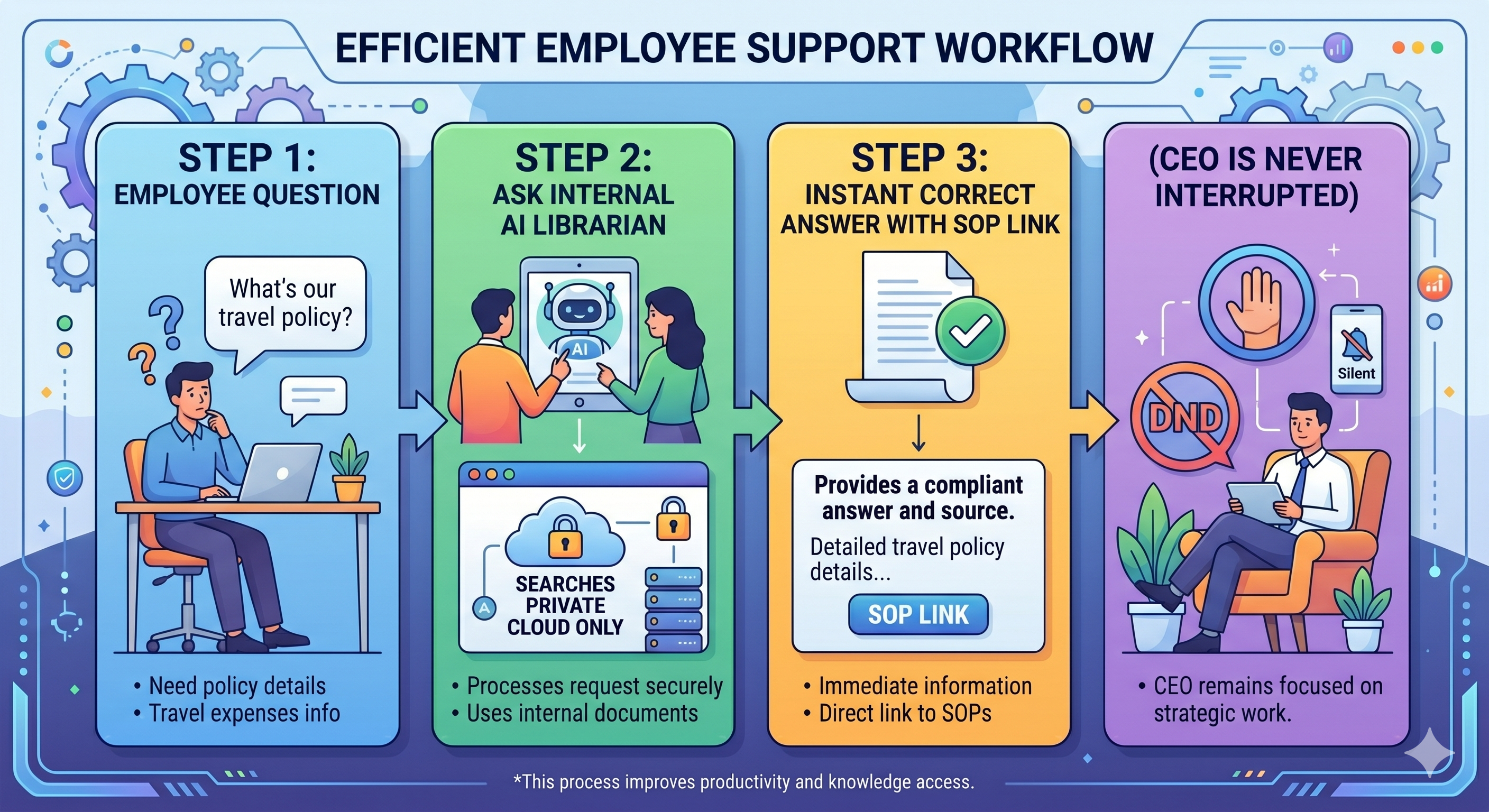
The Trigger: An employee needs to know a company procedure (e.g., "How do we handle a mobilization fee for out-of-town jobs?").
The System: Instead of emailing you, they type their question into your private, secure internal assistant.
The AI Step: The assistant utilizes a technology called RAG (Retrieval-Augmented Generation) to search only your company's official, approved Standard Operating Procedures (SOPs), past successful proposals, and onboarding guides.
The Answer: The system provides a direct, plain-English answer and includes a link to the exact document in your company library.
Your data stays 100% private. Your employees get immediate answers. And you don't spend your day answering questions you’ve already resolved ten times before.
Total Emails Replaced: Hundreds of internal back-and-forth messages every month.
📋 M3 Networks Copy-Paste CRM Prompt (Internal SOP Search):
"You are our company’s private, secure internal knowledge assistant. Your goal is to answer employee questions using ONLY the provided Standard Operating Procedures (SOPs) text. Do not make up answers, do not speculate, and do not use outside knowledge. If the answer is not explicitly detailed in the provided SOPs, state: 'I am sorry, I couldn't find that in our current SOPs. Please check with your manager so we can update our records.' Answer the following question:[Insert the question] based on this database: [Insert the link to your database]"
Workflow 5: The Lead Triage Specialist
Replaces: Sifting through spam forms to find actual business.
Every time someone fills out your website contact form, you get an email. Half of those forms are sales pitches, bots, or leads that are way too small for your business.
Yet, you or your sales managers still have to manually read every single one to ensure you don’t miss a "big fish."
Let’s let technology filter the stream:
The Trigger: A user submits a contact form on your website.
The AI Step: A secure assistant analyzes the submission. It cross-references the user’s company name with public business directories to determine their industry, estimated size, and location.
The Score: The system scores the lead based on your specific criteria.
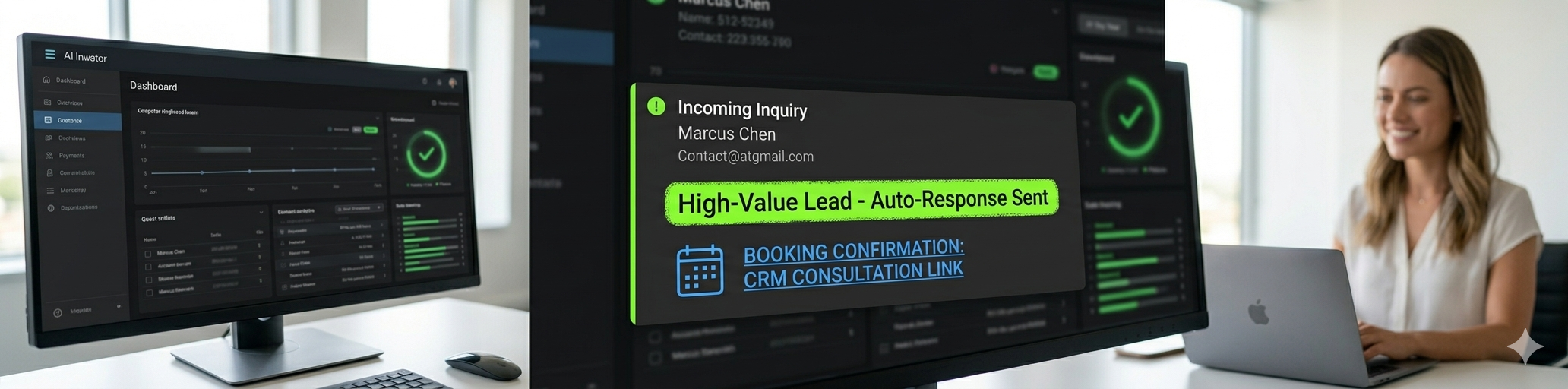
The Action: * If they are a perfect fit, the system automatically drafts a tailored, high-value response, attaches your scheduling link, and alerts your sales manager with a high-priority notification.
If they are not a fit (e.g., a salesperson trying to pitch you), the system archives the submission and keeps it completely out of your inbox.
Total Emails Replaced: ~40 inbox distractions a week.
📋 M3 Networks Copy-Paste CRM Prompt (Lead Evaluator):
"Analyze this raw inbound website contact form submission:
[Insert contact form details]
Evaluate the lead on a scale of 1 to 10 based on these criteria: 10 means a local, medium-sized business asking for secure workflows or IT support; 1 means a marketing agency pitching a service. If the lead is scored an 8 or above, write a highly customized, warm, 3-sentence email inviting them to book a quick 15-minute chat on our calendar. If the lead is a sales pitch or bot, output exactly: 'STATUS: ARCHIVE - SALES PITCH.'"
The Barbecue Test: Building the Pipes
Think of your business operations like a great backyard barbecue joint.
If you want to feed a crowd of hungry folks on a Saturday afternoon, you can't have your pitmaster running back and forth to the local grocery store every time you run out of salt, or manually carrying wood one log at a time from a mile down the road.
If you run your kitchen that way, the fire goes out, the brisket gets cold, and your customers leave angry.
You build the pipelines first. You stack the wood next to the pit. You secure your supply lines. You organize the workspace so that when the rush hits, everything flows naturally.
AI business workflow automation is simply building those pipelines for your business data. It ensures that information moves where it needs to go without you having to carry it yourself.
Clean Up the Noise, Win Back Your Time
You don’t have to automate all five of these workflows by tomorrow morning. Trying to do too much at once is a quick way to confuse your team and break your existing systems.
Pick one. Identify the single workflow that causes you the most "inbox anxiety" when you look at your screen.
Let's sit down, review that specific process, and build a secure, managed pipeline to handle it.
Let's make IT easy. Let's get your focus back where it belongs—on growing your business and enjoying your life. Book your AI Consult with us here!
People Also Ask
1. What is AI business workflow automation?
AI business workflow automation is the practice of using artificial intelligence and software integrations to execute repetitive, daily business tasks without human intervention. This includes routing data, triaging emails, summarizing meetings, and managing client onboarding securely.
2. How does automating workflows reduce email volume?
By setting up automatic database updates, secure document collection portals, and automated status alerts, you eliminate the need for manual "status update" and "follow-up" emails. This removes low-value conversational clutter and keeps your inbox focused only on high-priority messages.
3. Is my business data safe when using automated AI workflows?
Yes, but only if you avoid public, consumer-grade tools. A professional implementation uses secure, isolated cloud environments and private AI instances. This ensures all your proprietary business files, client information, and internal notes are fully encrypted and never shared with public training models.
4. What are the best workflows to automate first in a small business?
The most common and high-impact workflows to automate first are client onboarding, meeting transcription and task assignment, and automated accounts receivable/billing reminders. These processes are highly repetitive and consume significant administrative hours.
5. Do I need custom software to automate my business workflows?
No. Most business workflow automations can be built by securely integrating your existing business systems (such as Microsoft 365, QuickBooks, and your CRM) using professional automation platforms. A managed IT partner can design and build these integrations for you.